Product details
- Type
- Software, delivered as a code
- Region
- REGION FREE
- Delivery
- To your account and email after payment
- Payment
- Azvoro balance
Description
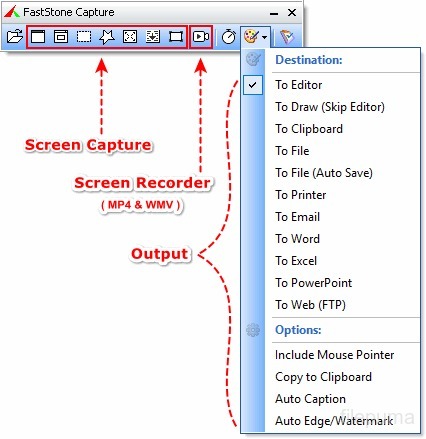
FastStone Capture is a powerful, lightweight, yet full-featured screen capture tool and screen video recorder. It allows you to easily capture and annotate anything on the screen including windows, objects, menus, full screen, rectangular / freehand / fixed regions as well as scrolling windows / web pages. It also allows you to record screen activities including onscreen changes, speech from microphone, audio from speakers, webcam, mouse movements and clicks into highly compressed video files. You can choose to send captures to editor, file, clipboard, printer, email, OneNote / Word / Excel / PowerPoint document or upload them to your website. Editing tools include annotating (texts, arrowed lines, highlights), resizing, cropping, sharpening, watermarking, applying edge effects and many more. Other features include pin-to-screen, text capturing, image scanning, global hotkeys, automatic filename generation, support for external editors, a color picker, a screen magnifier, a screen crosshair and a screen ruler. FastStone Capture saves images in BMP, GIF, JPEG, PCX, PNG, TGA, TIFF, WEBP, FSC and PDF formats. Built-in screen recorder saves videos in MP4 and WMV formats. Features A handy Capture Panel that provides quick access to its capture tools and output options Capture windows, objects, menus, full screen, rectangular/freehand/fixed-size regions and scrolling windows/web pages Capture multiple windows and objects including multi-level menus Capture text from images or screenshots using OCR (Optical Character Recognition) Pin screenshots on top of other windows, like sticky notes Record screen activities including onscreen changes, speech from microphone, audio from speakers, webcam, mouse movements and clicks into highly compressed video files (MP4 and WMV) Schedule recordings using a timer Screen Recorder has a built-in video editor that allows you to draw annotations, apply zoom effects and cut unwanted sections. Videos can be converted to animated GIF Screen Recorder provides a "Convert to MP4" tool that converts or resizes video files (MP4 and WMV) under various resolution and quality options Options to specify output destination (internal editor, clipboard, file, printer ...) Draw annotation objects such as callouts, straight/curved text, arrowed lines, highlights, watermarks, rectangles, circles, step numbers, emojis and much more Apply effects such as spotlight, drop-shadow, frame, torn-edge and fade-edge Blur selected area Add image caption Resize, crop, rotate, sharpen, brighten, adjust colors Undo/Redo Support tabs that allow you to capture and edit multiple screenshots simultaneously Organize and group tabs in multiple workspaces (optional). Each workspace remembers its last-used folder and works like a separate instance of the internal editor Support external editors Save images in BMP, GIF, JPEG, PCX, PNG, TGA, TIFF, WEBP and PDF formats Save images in FSC (FastStone Capture) format, a proprietary and loss-less format that preserve...
How to activate
Download the program https://www.faststonesoft.net/DN/FSCaptureSetup93.exe Install the program and activate the key
You may also like