RPG Maker VX Ace - Ancient Dungeons: Winter DLC Steam CD Key
- Format
- Add-on (DLC), delivered as a code
- Platform
- Steam
- Region
- REGION FREE
- Filed under
- DLC & add-ons
- Availability
- 11 in stock with our supplier
- Delivery
- To your lounge and your e-mail once the order is paid
- Paid with
- Your Azvoro balance
- Entry number
- 713033
About this entry
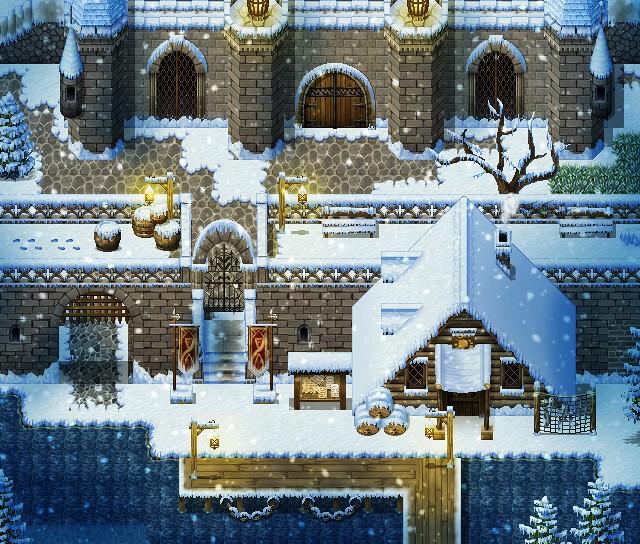
Created by Celianna, Ancient Dungeons: Winter has a snow version of the Base Pack exterior tiles, as well as an all new nature tileset, great for decorating your snowy landscapes. It's also perfect for those dark and cold caves. Not what you had in mind? Perhaps an ice palace is what you need for your game instead! This pack will have you covered. Features: Animated water auto-tiles, as well as an animated waterfall character set. A2 and A5 floors, including packed snow, ice and snowy variations of dirt, grass and stone. Animated tiles for doors, gates, chests, crystals, Christmas tree and light sources. Complete snow Tile B, including snowy cliffs, plants, stone formations, and other natural decor. Complete town Tile C, including snow-covered town essentials such as a well, bridges, tents and more. Complete cave Tile C, including inner ice and snow cave structures such as walls, stalagmites, stairs, and more. Complete town Tile D, including snow-covered roofs, market, fences, gateways and more. Complete ice palace Tile D, including crystal architecture, throne, and decorations Tile E, including windows and other essentials needed to bring your maps to life!
Activation
Go to: http://store.steampowered.com/ and download STEAM client Click "Install Steam" (from the upper right corner) Install and start application, login with your Account name and Password (create one if you don't have). Please follow these instructions to activate a new retail purchase on Steam: Launch Steam and log into your Steam account. Click the Games Menu. Choose Activate a Product on Steam... Follow the onscreen instructions to complete the process. After successful code verification go to the "MY GAMES" tab and start downloading.